
Content Buddy · by Arkas Digital
Your own content machine. Built around your business.
Content Buddy makes reels, image posts and carousels in your brand, your voice and your rules, on your own computer. You press a button. It researches, writes and builds the piece. You check it and post it.
One-time setup. No monthly software fee. No limit on how much you make.
- Your brand
- Your facts
- Your footage
- Your computer



 Caption and hashtags ready
Nothing posts by itself
Caption and hashtags ready
Nothing posts by itself
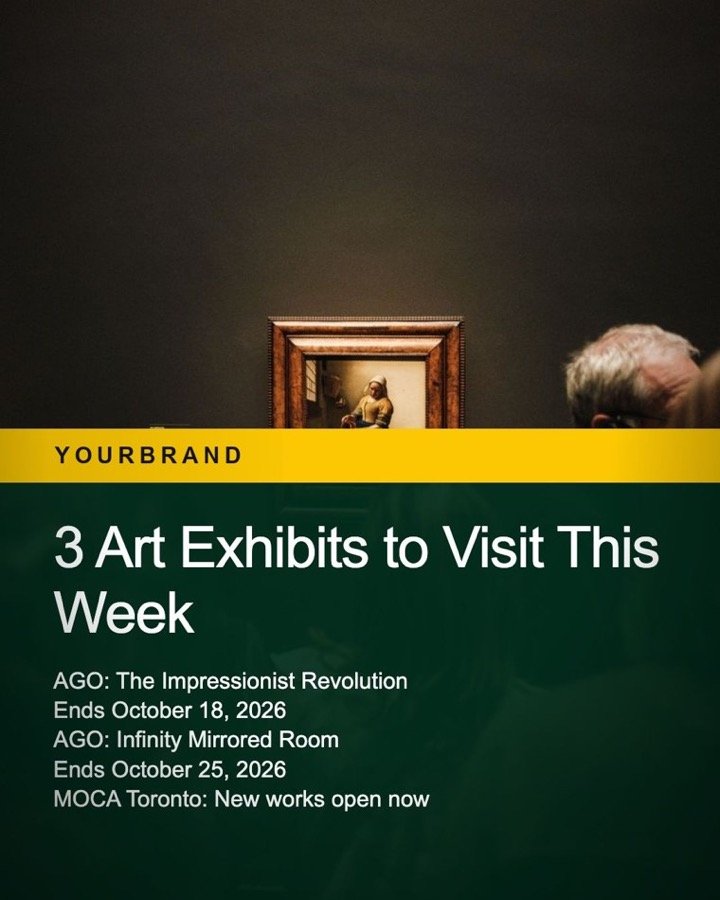








Real content made with Content Buddy, shown with a sample brand.
The problem
Posting every week is a job in itself.
Finding ideas, writing scripts, recording a voice, editing video, making captions. Your customers look you up before they ever call. If the last post is from two months ago, it feels like nobody’s home.
Doing it yourself
Ideas, scripts, voice-overs, editing, captions, hashtags. It eats your evenings, so it’s the first thing that stops when you get busy.
Posting rarely
A quiet page looks like a closed business. The customer moves on, and you never know it happened.
Generic AI tools
Fast, but your feed ends up looking like everyone else’s. They don’t know your business, and they confidently get facts wrong.
Social media doesn’t reward the best business. It rewards the one that shows up consistently.
What if consistency took a button press?Content Buddy is a content system set up for your business alone. It knows your brand, your facts and your rules.
The answer
Content that sounds like you, looks like you, and gets your facts right.
Not another app to learn. A system we build around you, set up once and ready to go.
Your brand, built in
Your logo, colours, fonts and handle are set up once. Every reel, post and carousel comes out on-brand, with no designer and no fiddling.
Your voice and rules
It writes the way your business speaks, and never uses the words or topics you ban.
Your facts, checked
It writes from your business details. If it uses a number or date it can’t confirm, it stops and asks you first. No made-up prices, years or claims on your page.
Your footage first
Upload your own videos and photos. They are used before any stock footage. Your real place, your real work.
Your templates
Templates designed for your brand, so your feed looks like you, not like a generic AI app.
Your computer, your data
It runs on your computer. Your footage and content stay with you.
Made with Content Buddy
One topic in. Finished content out.
Every piece below was made by Content Buddy from a single topic: script, voice-over, footage, captions, design, caption text and hashtags.
Reels · vertical video with script, natural voice, matching footage (yours first) and captions timed to the voice
Image posts · branded photo, headline and key facts
Carousels · multi-slide posts, ready to swipe and save
Real examples, shown with a sample brand. Your setup uses your own brand and templates.
Talking-head videos · upload a recording of you speaking. Pauses are cut, captions added, and short cutaways placed over your voice. It can also write the script for you to read.
News cards · paste a news story or blog link. It writes about it from your business’s point of view, without copying.
How it works
If you can send a text message, you can run Content Buddy.
Three steps. No editing software, no design skills, no writing from a blank page.
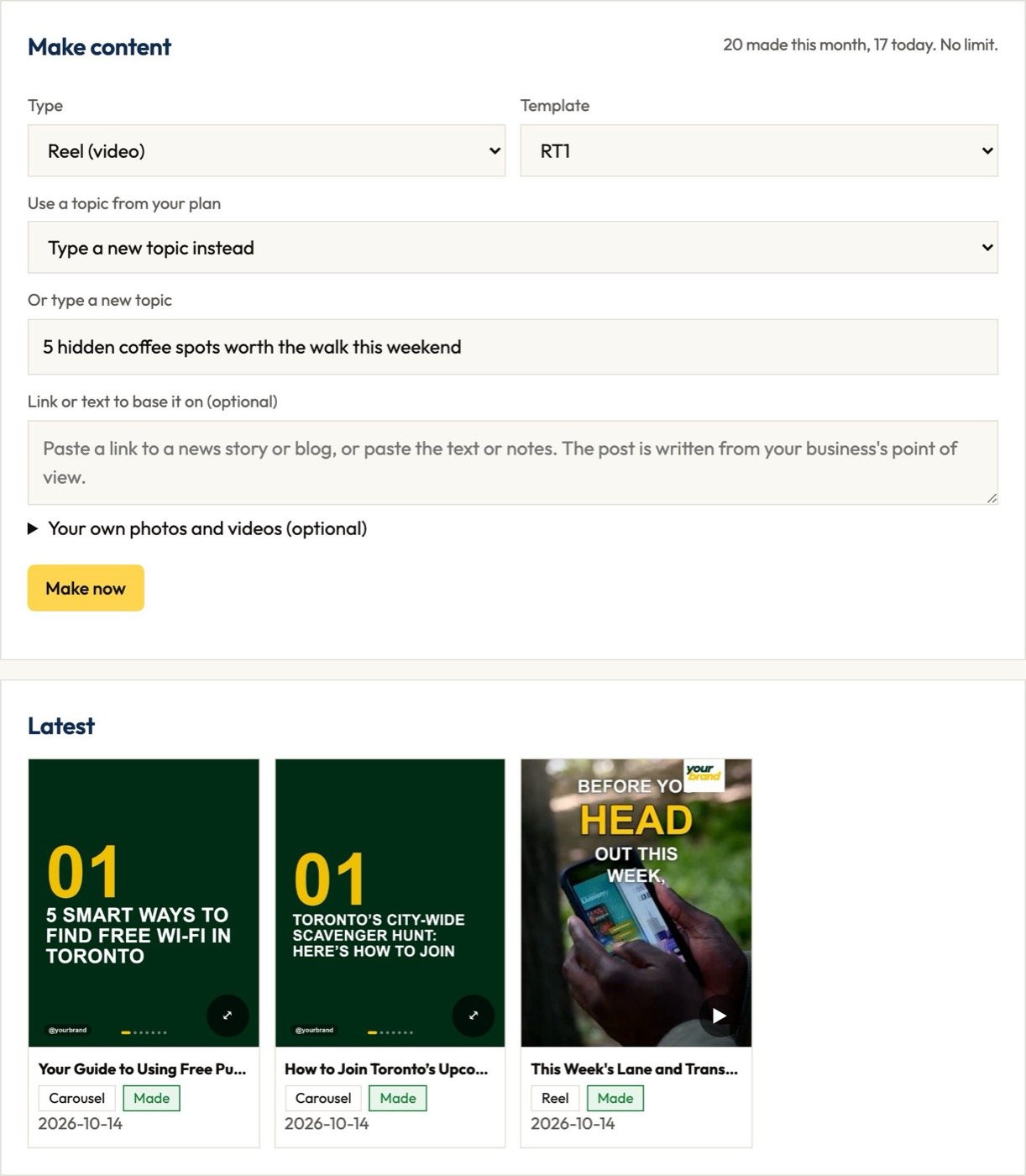
Pick a topic.
Type one in plain words, paste a news or blog link, or press Get ideas from AI to fill your plan.
Press Make.
It researches, writes, adds the voice and builds the piece in a few minutes. Make one, or the next five in a row. You can walk away while it works.
Check and post.
Watch it, download it, copy the caption, post it. Nothing posts by itself: you stay in control.
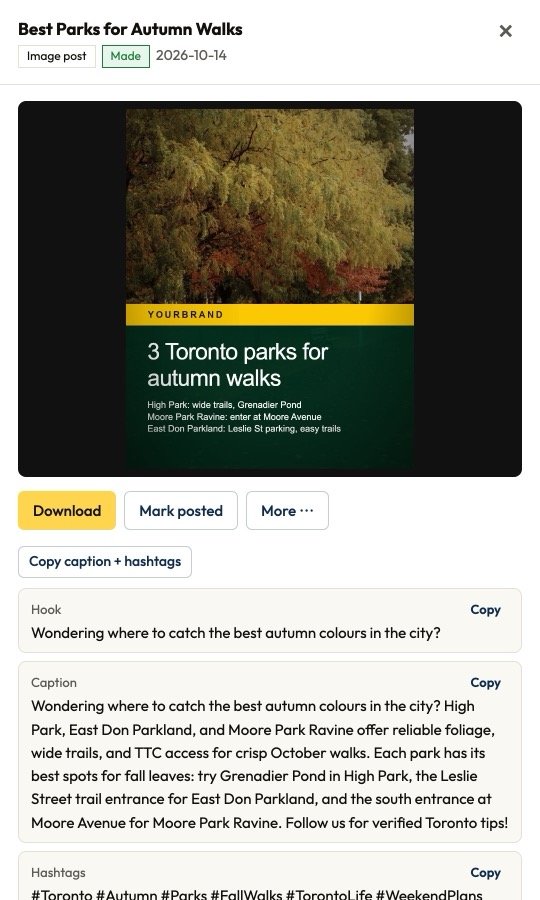
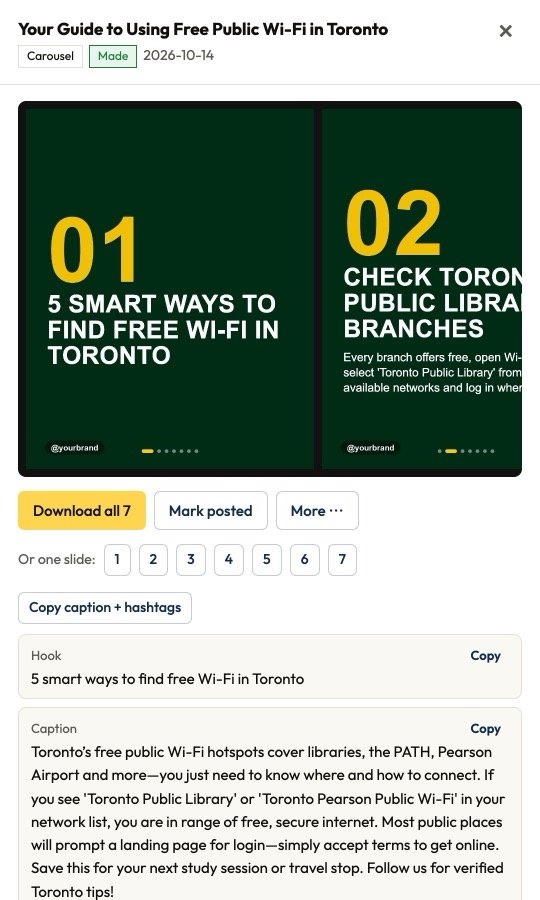
Everything ready to post.
Every piece comes with a scroll-stopping hook, a full caption written in your voice, and hashtags. One click copies the caption and hashtags together, ready to paste.
- No editing software
- No design skills
- No writing from a blank page
Consistency, built in
Plan a month in one sitting. Make it whenever you like.
Consistency fails when every post starts from zero. Content Buddy gives you a plan and a single button to work through it.
Never run out of ideas
Press Get ideas from AI and it suggests topics that fit your business. Keep the good ones and add your own.
Batch a week at once
Make next 5 works through your plan in order while you do something else.
The same look, every time
Your templates keep every piece recognizably yours, so followers know it’s you before they read a word.
Change the look anytime
Re-render a finished video in another of your templates, without starting over.
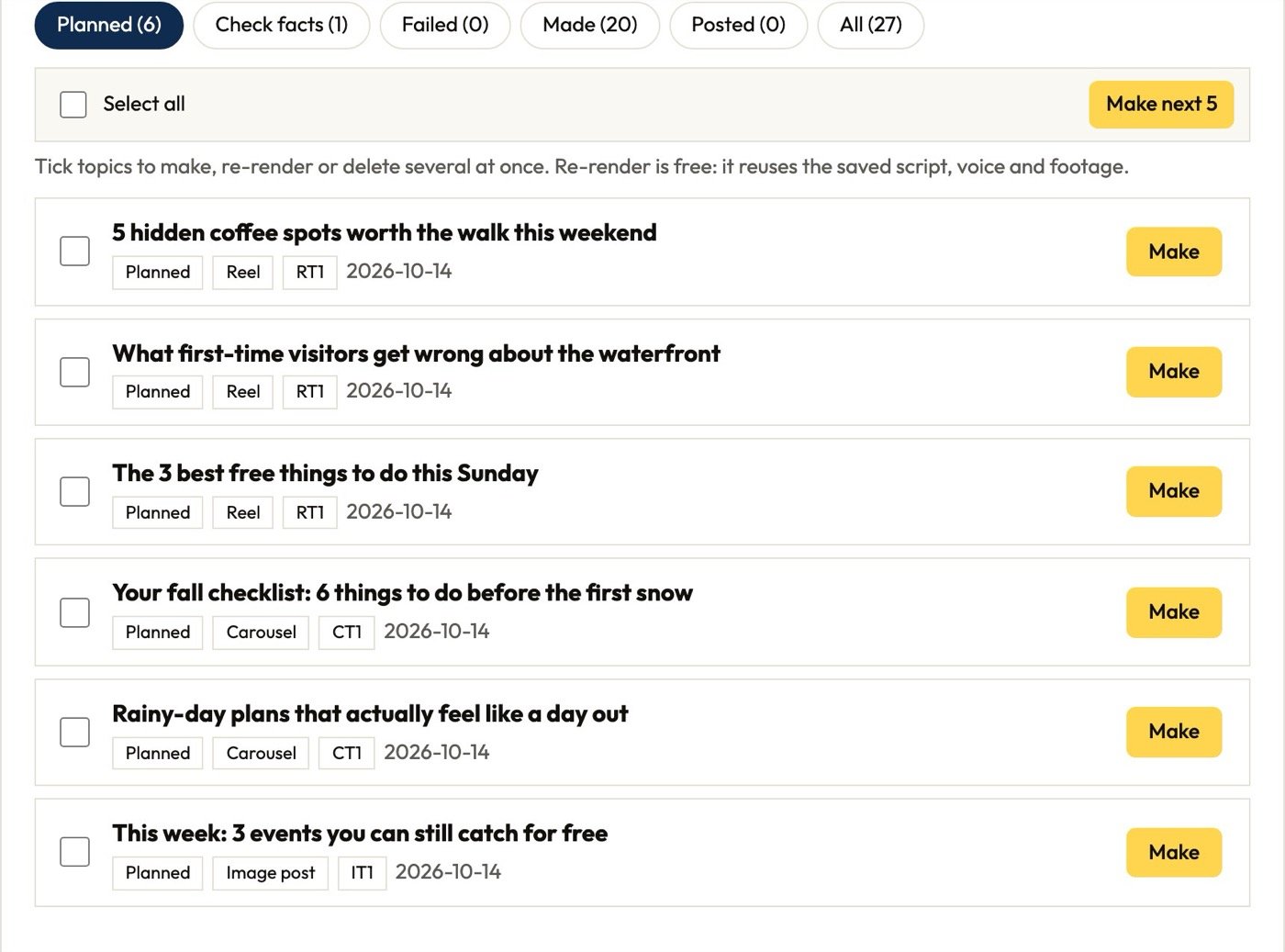
One sitting to plan. One button to make. A feed that never goes quiet.
Protects your reputation
Fast is good. Right is better.
Generic AI tools will happily invent a price, a year or a claim and put it on your page. Content Buddy is built to stop that.
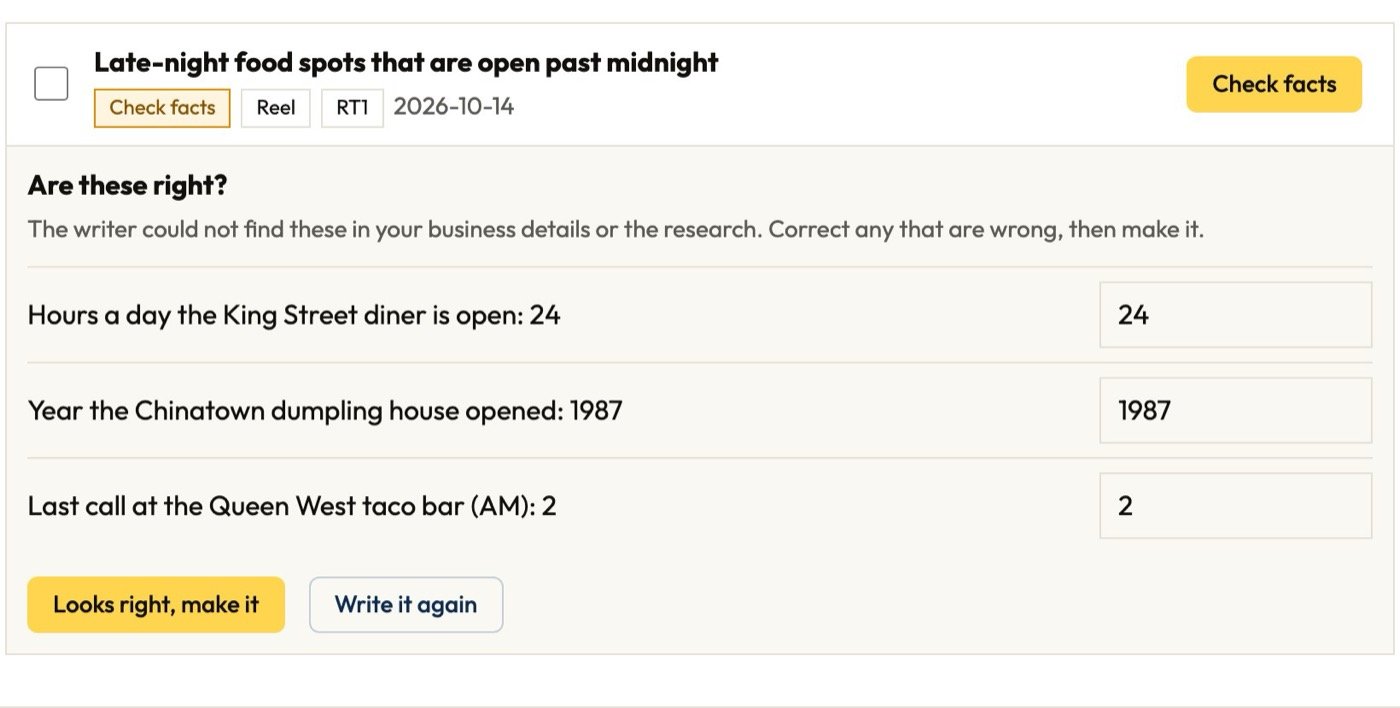
Your facts, your rules
It writes from your business details and checks real names, places and rules. Words and topics you ban are never used.
You approve everything
Nothing posts by itself. Every piece waits for you to watch, check and post it yourself.
Your data stays with you
It runs on your computer. Your footage and your finished content stay on your machine.
Clear when something’s wrong
If something fails, it says what happened in plain words. Fix it and press Try again: it picks up where it stopped.
Who it’s for
Your place. Your face. Your whole team.
Solo businesses and owners
Post consistently without learning video editing. Upload videos and photos of your shop, your work or your listings, with a few words about each. They go in where the script talks about them.
You on camera, without the editing
Record yourself on your phone and upload it. Pauses are cut, captions follow your words, and cutaways drop in. Not sure what to say? It writes the script for you to read.
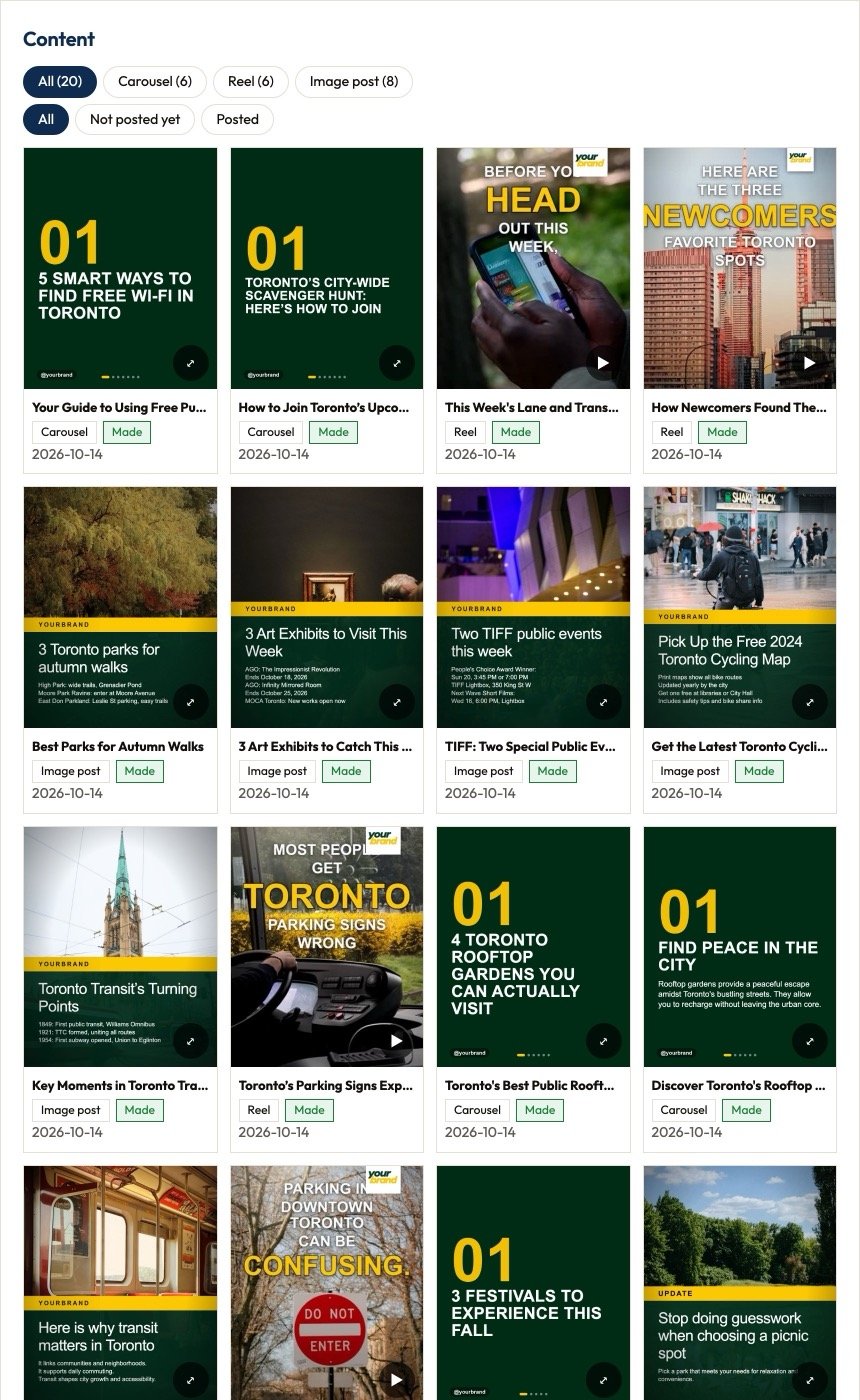
Every piece, in one place
Your Content library shows everything you’ve made. Filter what’s posted and what isn’t, play reels in place, and download in one click.
What you get
We set it up. You start posting.
Every business is different. In your demo we look at your brand, your goals and your team, show you what your setup will include, and give you your price.
Setup and install
- One-time setup
- Installed on your computer by us
- Your brand set up: logo, colours, fonts, handle
- Your Business pack: business facts, writing voice, rules, topics to avoid
- Templates designed for your brand
- Everything ready to use from day one
- One training session, where you make your first content with us
- Quick guide and full user manual
- No monthly software fee and no limit on how much you make
Free demo
See Content Buddy make a piece live, and talk through your business and goals.
We build your setup
Your brand, Business pack and templates, installed and ready on your computer.
Training
We walk you through it and you make your first content with us, start to finish.
You’re posting
Plan, make, check, post. When you need a new template or a change, we’re a message away.
Teams
Every person on your team gets their own full setup, with their name, area and voice, in your team’s brand. Everyone posts consistently, and everything looks like it came from one company. The bigger the team, the lower the price per person.
Your price is shared in your demo, based on your setup and team size.
Support and custom work, without a contract
New templates, changes to your brand or setup, extra training, and help with problems are quoted per hour. You only pay for what you use. Press Copy for support in the app and send it to us: we see exactly what’s going on.
The difference
Why Content Buddy and not a free AI app
| Feature | Content Buddy | Typical AI content apps |
|---|---|---|
| Look | Templates designed for your brand | Same templates everyone uses |
| Facts | Uses your business details, asks about numbers it can’t confirm | Can invent claims |
| Footage | Your own footage first | Mostly stock |
| Price | One-time setup, no monthly software fee | Monthly subscription per user |
| Data | On your computer | On their servers |
| Help | Set up and looked after by a real person | Help chat |
Questions
Questions, answered
Anything else? Ask us in your free demo.
Does it post for me?
No. You check each piece and post it yourself, so nothing goes out without your approval.
Is there a limit on how much I can make?
No. Make as much as you want.
Do I need to be technical?
No. We install and set everything up. You use a simple dashboard in your browser.
What computer do I need?
A Mac. For Windows, ask us. Keep at least 5 GB of free disk space for finished videos.
Can I use my own videos and photos?
Yes. Upload them with a few words on what each shows. They are used before stock footage.
Can I appear on camera?
Yes. Upload a recording of yourself. It cuts the pauses, adds captions and places cutaways. It can write the script for you too.
What if I want another template or a change later?
We build it for you, quoted per hour.
Can it grow with us?
Yes. Add templates, content types or team members whenever you’re ready.
Who owns the content?
You do. Arkas Digital owns the software, and you use it under the Content Buddy licence.
What does it cost?
Every setup is different. We go through your price in your free demo.
Free demo
See it make your content.
Book a free demo. We’ll show you Content Buddy making a reel live and talk through the setup for you or your team.
Content Buddy is a product by Arkas Digital · arkasdigital.ca